


QUICKFIRE
Minimize your cooking time
with shortcut recipes
ARTIFAQ LA
PROJECT: Mobile App Design
PROCESS: User Research, Prototype, Visual Design, Usability Testing, Iteration
TOOLS:


ABOUT THE PROJECT
PROBLEM STATEMENT
Finding the motivation to cook on a regular basis can be tough. Not only is it time consuming to plan and then cook meals, searching for inspiring recipes is a feat in itself. And when you do find the perfect recipe, the ingredients list may take you on multiple shopping trips.
PRODUCT
Cooking meals at home can be delicious, quick, and less of a hassle. The QuickFire mobile app is a digital cookbook for shortcut recipes. A shortcut recipe offers a semi-homemade meal with a shopping list of both fresh and pre-packaged ingredients. Best of all, the ingredients can be located at a single grocery store.
HOW MIGHT WE?
How might we make this everyday activity EASIER, QUICKER, and still INSPIRING for your average home chef?
EASIER
guided step by step directions
QUICKER
shortcut recipes with ingredients (fresh and / or
pre-packaged) located in a single grocery store
INSPIRING
“Just For You” browsing features curated recipes based on your history & saves
USER RESEARCH
TARGET MARKET
This app caters to working people between the ages of 25-40 who want to quickly plan, shop, and cook meals. They maintain busy schedules but still need to regularly cook for their families and love ones.
USER INTERVIEWS
The preliminary research was centered around discovering user needs. This was done through a series of interviews including 3 participants, 2 directly in my target market and 1 in a secondary target market.
A few key insights:
-
Participants either “google” new recipes or become inspired by watching Tasty recipe videos
-
All participants love exploring new recipes or cuisines
-
They all have a limited time to prep and cook
PERSONAS
Findings were analyzed, and personas were created as archetypes of the users.


COMPETITIVE ANALYSIS
The next step was to explore the competition who also has overlapping concepts to QuickFire and also targets similar demographic. I found that while there are many recipe apps on the market, there is not one app that caters specifically to quick recipes.

UX DESIGN
During this step, design ideas were brainstormed, sketched, and narrowed down into key features for the app.
USER FLOW
I proceeded to create a flowchart that maps out the use's steps throughout the app.

WIREFRAMES
After mapping out the user experience, I chose the most important screens and quickly sketched the MVP screens. I iterated these sketches a few times and then digitized them as low fidelity wireframes.


Visual Design
To start the interface design process, I chose a few design patterns to explore. I noted a few examples from mobile design libraries that served as a benchmark for my interface. I took this approach because there are many recipe apps on the market, and therefore, users have a mental model of how they expect a recipe app to look and behave. From here, I customized the design patterns to fit with my app concept and created a rough style guide.

The Process is Iterative
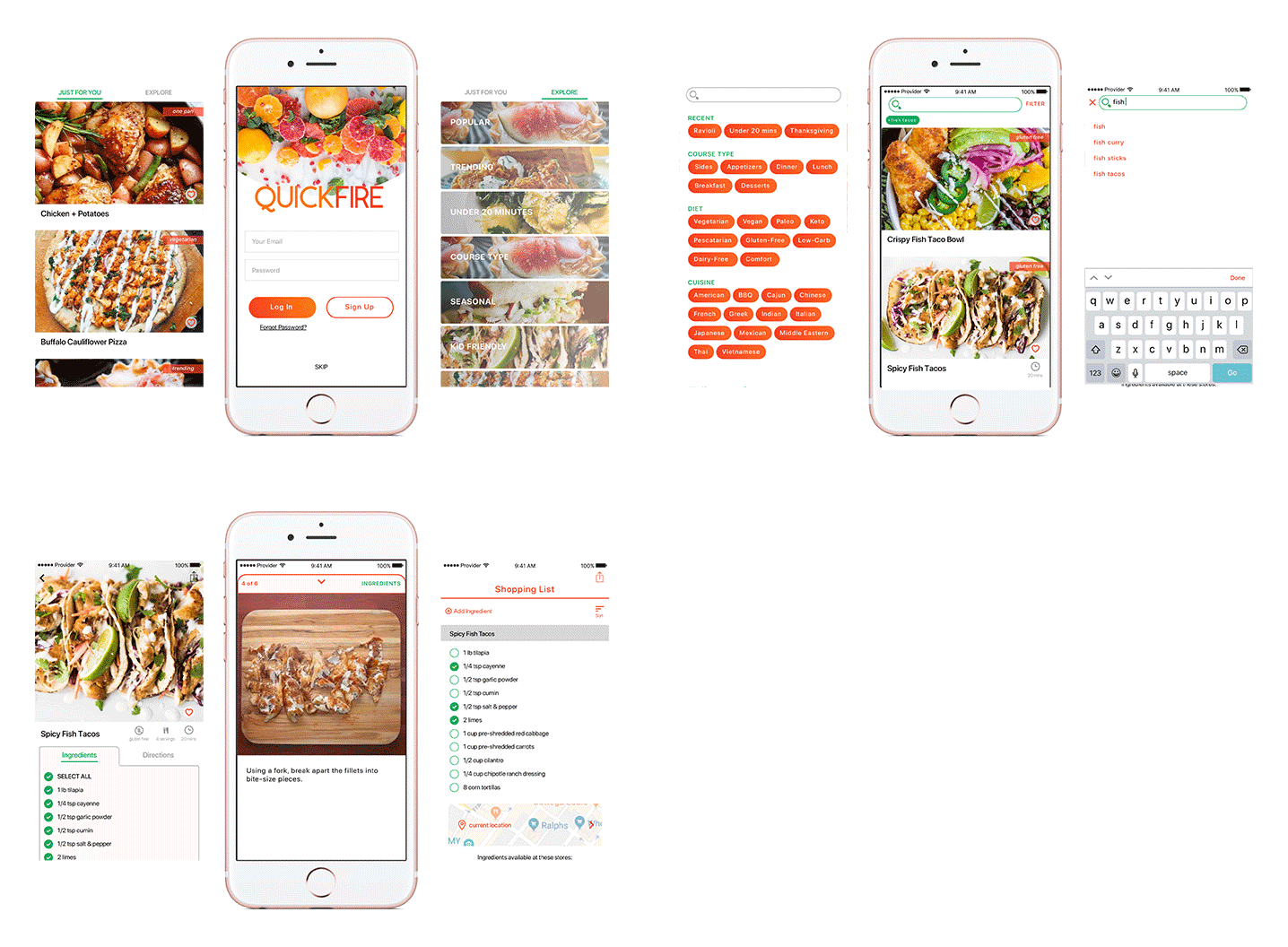
I drafted a sitemap and developed a minimal, working prototype. With this first version, I performed a user testing on three participants. Users were prompted to complete 5 pre-planned tasks. While performing these tasks in the app, I collected feedback on usability and user experience.
REVISITING THE USER FLOW

FIRST HI-FI PROTOTYPE
USABILITY TESTING
Overall the app navigation feel natural of what is expected from similar apps. Users enjoy the simplicity of app and the big images. Users also appreciate the pre-scoped tags under the “Search” function and how the recipe directions broken down into easy to digest steps. Most issues were problems with discoverability of buttons and actions.
The problem screens were:
-
detailed recipe page
-
step by step feature
-
editing shopping list

NEXT STEPS
With many recipe apps currently on the market, QuickFire must stay competitive by continuously updating the product to satisfy users needs. Of course the app should not be overwhelmed with new features, but there are a few that users have come to expect from any recipe app.
Here are a few personalization features that will be included in the next iteration:
-
Ability to modify or make notes on recipes
-
Rating system and a “made it” button
-
Ability for users to upload their own recipe
I would also like to explore grocery delivery services to further expedite the shopping process.
Perhaps I can integrate Instacart within the app. Another approach could direct users to the grocery store's unique pickup / delivery app, such as Whole Foods and Ralph's.